Governance, built into the core
In MindooDB, governance is a property of the data layer itself - not an add-on bolted onto a trusted server or application tier. Access policy, identity, and a cryptographically provable, point-in-time-reproducible audit trail are stored and enforced in the database core. The payoff: you can prove not just what changed, but who was allowed to change it - at the moment it actually entered the tenant.
It has two halves: a write side that controls who may create, change, or delete documents - enforced even when users are offline - and a read side that controls who may see data, combining a sync-level access gate with admin-blind key distribution. Both build on MindooDB's end-to-end encryption.
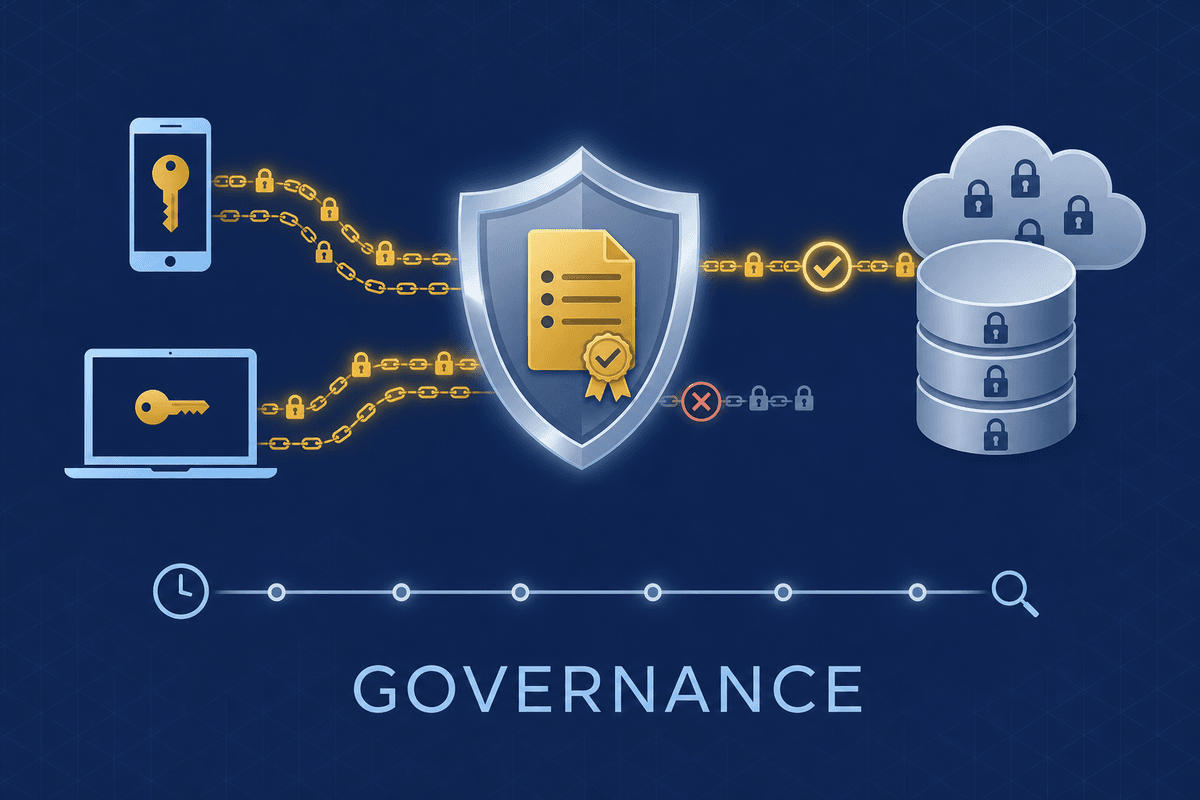
Governance is a property of the data layer
Most stacks push governance up to the server or application: the database stores rows, and something else decides who may touch them and keeps the log. MindooDB inverts that. Policy, identity, full history, and the audit trail live in the same end-to-end-encrypted, append-only stores - so the guarantees travel with the data across servers, peers, and offline devices, and survive a fully compromised server.
Policies and rules are admin-signed documents in the directory database, themselves append-only. The exact moment governance was switched on - or temporarily disabled - is part of the permanent record, not a config change that leaves no trace.
Every entry carries a trusted time, and the directory keeps a time-travel chain of its own history. So wasAllowedAt(op, user, dbid, at) can replay what the rules were and who was authorized at any past moment - a deterministic verdict every honest replica agrees on.
Every change is Ed25519-signed for non-repudiation and witnessed against a trusted clock. Violations aren't silently dropped - they're recorded in a per-tenant quarantine/audit log surfaced in Haven, so even rejected attempts are accountable.
Grants hold per-device key arrays; revocation is simply removing keys, and an explicit remote device wipe drops the whole tenant from a stolen or departed device on next connect - the identity lifecycle is governed in the same signed directory.
The two-tier model
Every rule falls into one of two tiers, based on what the sync server can see. The server only ever handles ciphertext plus a small set of cleartext metadata - it can never read document bodies. That single distinction is the whole architecture: it lets MindooDB make an honest promise about exactly what is cryptographically guaranteed versus what is enforced by policy among cooperating clients.
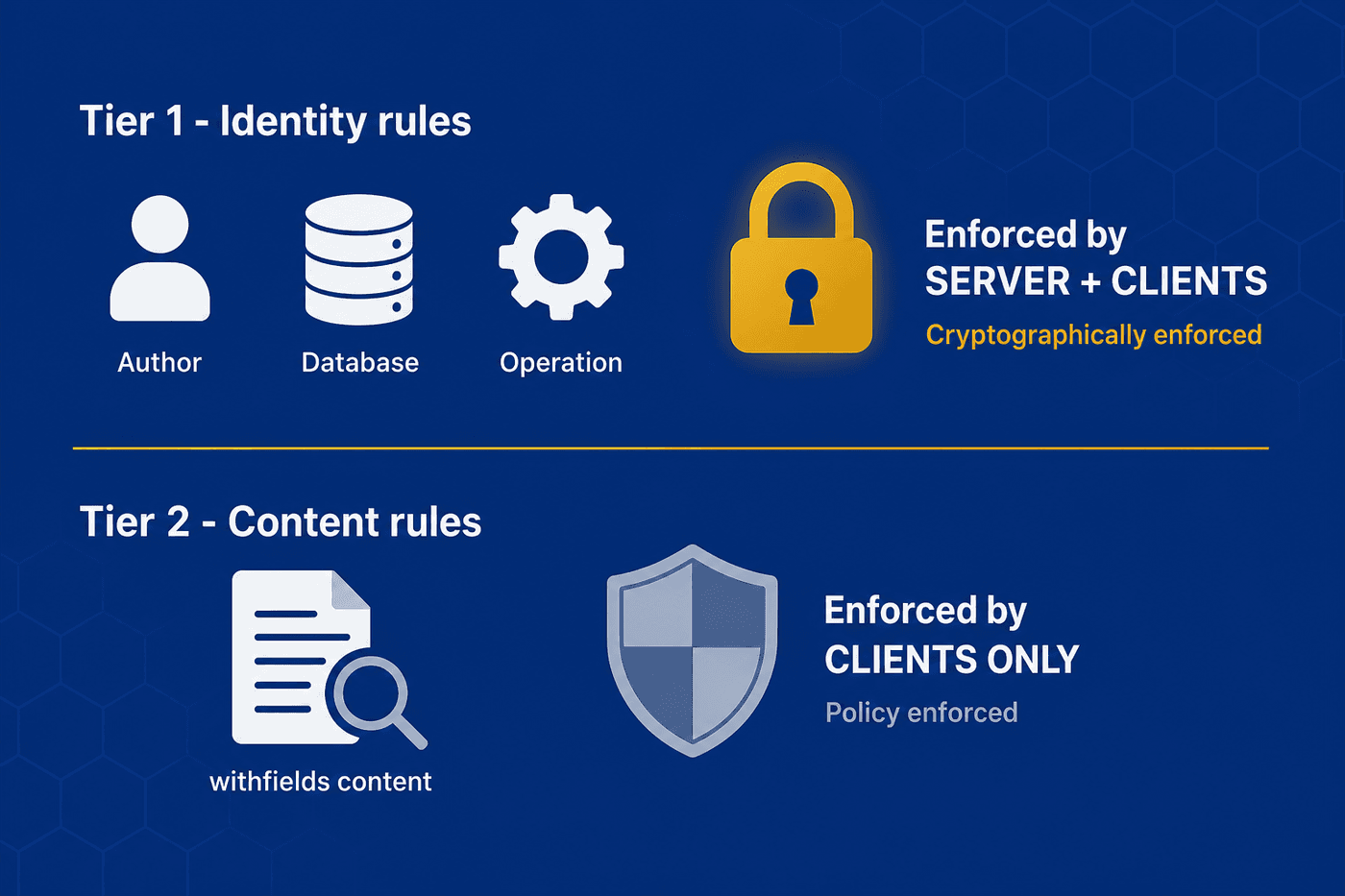
| Tier | What it checks | Enforced by | Strength |
|---|---|---|---|
| Tier 1 - Identity | Author identity, target database, operation type | Server and clients | Cryptographic - the server refuses to witness a violating entry, so it cannot propagate |
| Tier 2 - Content | The actual document content (withfields) | Clients only | Policy - gates honest clients and shapes UX. A tampered client can only bypass it locally; every honest replica re-checks withfields on receipt and quarantines a violating change, so it never becomes visible to anyone else |
Witness receipts: a trusted clock you don't have to trust the client for
The hardest question in an local-first system is "which clock do we trust?". A user working offline could backdate their own entries to slip a change past a policy. MindooDB answers this with a witness receipt: an attestation, signed by a trusted witness (your sync server), that an entry was accepted at a specific time. Each enforcement point then uses exactly one well-defined clock.
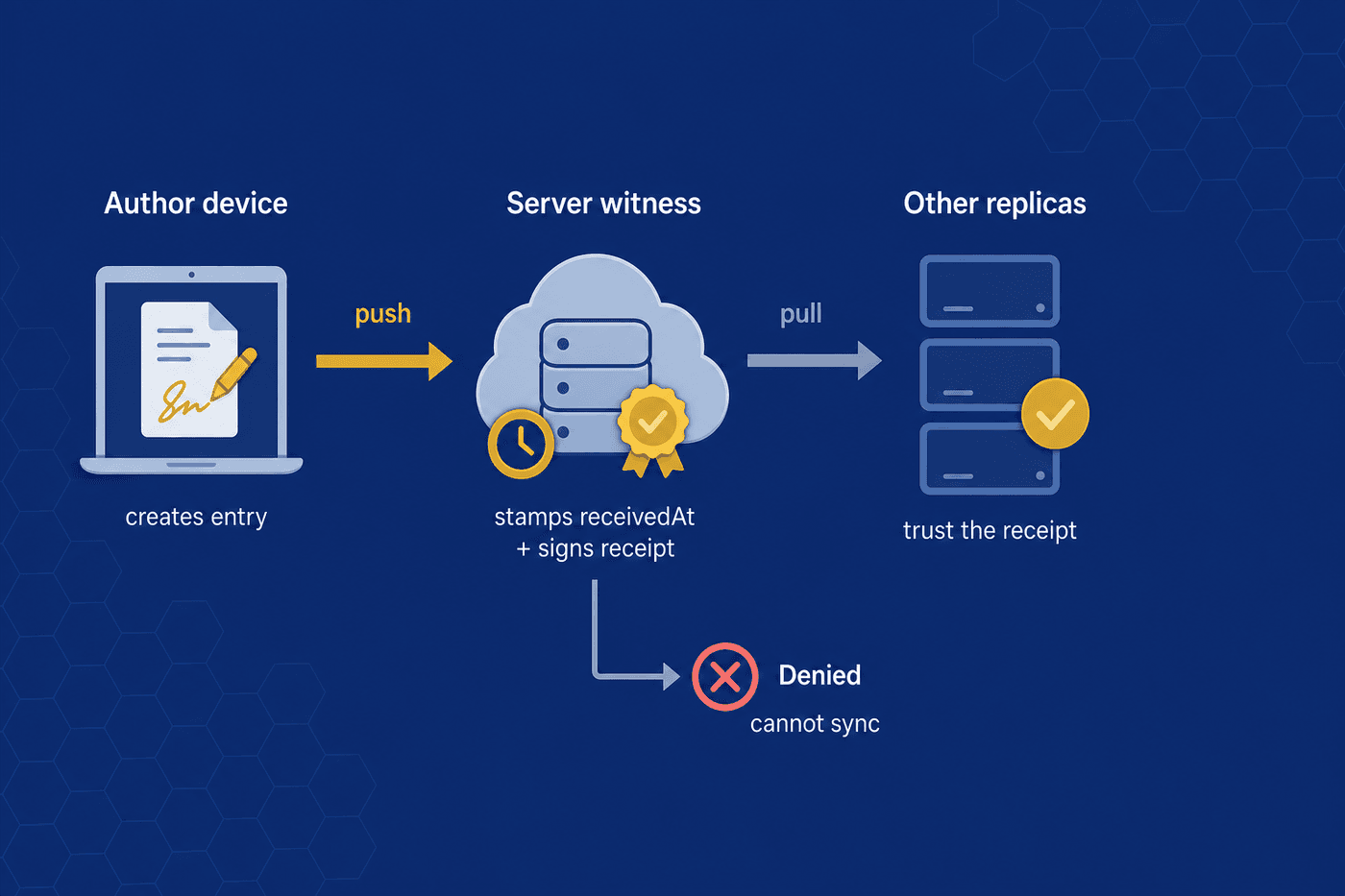
The SDK evaluates Tier 1 + Tier 2 against the user's local directory state at the current local time. If allowed, the entry is stored locally with no witness fields and is visible immediately on this device. A user's own clock governs their own local-only view - that's fine, because the change hasn't entered the shared tenant yet.
The server evaluates Tier 1 against its own state at server time. If allowed, it stamps receivedAt, records the witness key, signs the receipt, and returns the witness fields so they flow back to the sender and onward. If denied, it returns a structured AccessDenied and the entry stays local - it cannot propagate.
The receiver verifies the receipt signature against its trusted-witness list. A valid signature means Tier 1 was satisfied at receivedAt, so by default it isn't re-evaluated. The receiver then checks Tier 2 locally and either materializes the change or routes it to a local quarantine/audit log.
How decisions are configured
All access-control state lives in the admin-only directory database and syncs to every participant. Everything the server needs for Tier 1 is encrypted with the $publicinfos key so it can be read without holding the default tenant key; withfields content is never readable by the server. Every mutating call is admin-signed.
A default tenant policy and optional per-database policies define which operations are denied unless an allow rule matches:
- Create, change, delete & undelete - allowed by default, until you deny them
- Snapshot & purge - admin-only by default
- Read - the baseline for the database-level read/sync gate, refined by read rules
- Allowed database ids - the tenant's allowlist of which databases may exist; the server refuses to create or sync any database outside it
- Default encryption key - which key a new document uses when none is given; a convenience, not a security control
- Master off switch - one flag that disables every access check at once
A brand-new tenant has no policy document at all, so everything is allowed until an admin writes one. Every revision is appended to history, so the exact enable/disable window stays auditable. Crucially, each change is judged against the policies that were active at its own trusted time (receivedAt): changes that entered the tenant after activation are covered, while earlier ones resolve against the implicit all-allow default - so pre-existing data is grandfathered in automatically, with no migration step.
Each rule targets an operation type and a database ("*" = all), and lists the users or groups it applies to. Evaluation is set-based and order-independent:
- any matching deny rule → denied
- else any matching allow rule → allowed
- else the baseline policy decides
Order-independence matters because rule documents merge across replicas via CRDTs - no rule ordering to disagree about.
A server can only reach a Tier 1 verdict. If the only thing standing between allow and deny is a Tier 2 content rule, it treats the entry as Tier 1-allowed and leaves the withfields check to the clients. Every decision returns a structured result - allowed, a human-readable reason, the matchedRuleId, and the tier - which the SDK uses to grey out actions a user can't perform.
A withfields clause checks a dot-path inside the document with a closed set of operators (equals, contains, gt, …) and placeholders like ${user.usernames}. Each clause is evaluated against a chosen document state:
- before - the existing document (default for change/delete): "you must already be an editor". Evaluating after would let someone add themselves and authorize their own edit.
- after - the document with the change applied (default for create): "the creator must add themselves to
myeditors".
Rules match against a user's hashed username, their group hashes (including nested groups), and reserved pseudo-tokens:
$everyone- all registered users$admin- admin only$author- the original creator of the document (Tier 1, ownership model)
Revocation is performed by removing keys from the admin-signed grant document - no separate revocation docs. An admin can also issue an explicit, opt-in remote device wipe by signing key, dropping the tenant from a stolen or departed device the next time it connects.
A CRM with per-record editors
This walks one realistic policy end-to-end so the moving parts line up. The tenant has a crm database, and we want four rules: everyone may create contacts but must put themselves in myeditors; only an already-listed editor may change a contact; only the original creator may delete it; and the HR group may change anything as a supervisor escape hatch.
Baseline is deny. Rule 1 matches via $everyone, and its withfields passes because the after state's myeditors contains Alice → allowed. The server only confirms Tier 1, then witnesses the entry.
Rule 2 matches by $everyone, but its withfields fails: the before state's myeditors doesn't contain Bob → denied locally, even if his change tries to add himself. A tampered client could push it, but every honest receiver quarantines it on materialization.
Rule 3 matches via $author - the creator key and the delete signer resolve to the same user → allowed and witnessed (Tier 1, survives a malicious client). Rule 4 lets any HR-group member change any contact regardless of myeditors.
This shows the division of labor: Tier 1 rules ($author, group hr) are enforced at the server and survive a malicious client; Tier 2 rules (the myeditors content checks) are enforced by every honest client and quarantined on receipt if violated.
Read access control
Write rules decide who may change data; read access decides who may see it - and MindooDB enforces it on two levels, both admin-signed and $publicinfos-encrypted so the zero-trust server can act on the metadata it needs without ever holding the tenant key.
1. A database-level read/sync gate. A denyDocRead baseline plus doc_read rules (the same deny-overrides-allow evaluation, targeting users, groups, $everyone or $admin) decide who may open and sync a database at all. It is woven directly into the sync system: a user who loses read access stops receiving updates and can no longer even open their already-synced local copy. Because the gate sits in front of every sync operation, read is the master per-database gate - it also gates writes: a user who cannot read a database cannot create data in it either (and would otherwise author documents they could never see).
2. Document confidentiality stays cryptographic. A document can only be read by someone whose KeyBag (their personal, password-protected key store) holds a key that decrypts it - the server never makes a read decision here. Key distribution is how those keys get to the right people securely: an admin-signed policy says which users and groups should hold each key, and every client keeps its KeyBag in sync with it automatically. It is opt-in - with the shared default key and no read gate, everyone can read everything, exactly as before.
At the server choke point, the same hook that evaluates the database-id allowlist also evaluates doc_read for the authenticated principal against trusted server time, and refuses to serve or accept pushes for a denied database - disallowed updates are simply never delivered. In lockstep, the client open path refuses to open a database the user has lost access to, so a revoked user can't even read their locally synced copy. The directory database is never gated (it carries the very policies the gate depends on); the admin is exempt.
When a key is pushed to a user, it is encrypted with that user's personal public (RSA) key, so only they can unwrap it - no other user, and not even the admin, can read the key. That's why distribution is admin-blind: a user who already holds the key wraps it for the recipients, and the admin only signs and publishes the result. A regular user can prepare a distribution and hand it to an admin to sign, even an admin who doesn't hold the key.
Each client keeps its KeyBag in sync with the policy on startup and after every sync. Push a key to a user and their next sync pulls in the documents that key unlocks - they simply appear in the database, now readable. Pull a key back and those documents disappear: the local copies that can no longer be decrypted are dropped from the database, caches, and views. Promotions, rotations, and department moves all flow through this automatically.
As a bandwidth safeguard, the server also stops delivering data encrypted with a key a user has lost. But a removed user who kept an old copy can still read what they already had - so the true cutoff is rotation: issue a fresh version of the key to the remaining recipients only, and every future change uses a version the removed user never received.
Policy-based app distribution
The same admin-signed machinery that distributes keys also distributes Haven applications. An admin publishes a policy that names which apps a tenant offers and who should receive them, and every Haven client reconciles its local applications list against that policy after the directory syncs - so onboarding a user to a tenant automatically installs the apps that tenant publishes, and revoking access removes them again.
Unlike a key, an app carries no secret, so distribution is simply about who gets what. The app definition and its metadata are encrypted with the tenant key, so the zero-trust server only ever sees ciphertext while still routing the policy to the right recipients.
A policy targets both individual users and whole groups. A push list says who should receive an app; a pull list takes it back. Group membership is resolved at distribution time, so adding or removing someone from a group changes who gets the app without touching the policy, and a pull always wins over a push when the two overlap.
A regular user can prepare a new distribution - or a change to an existing one - and hand it to an admin as a ready-to-sign request. The admin reviews it and signs the policy document; only that admin signature makes it authoritative. It mirrors key distribution exactly, so the same people who already manage keys manage apps.
After each directory sync, every client compares the policy with what it has locally: it installs apps it should now have, updates one when the published version or details change, and removes any app it is no longer entitled to - all without the user lifting a finger.
A distributed app is labelled tenant managed and shows which tenant it came from. Managed apps can't be edited or removed by the user - only duplicated into a private copy for local building and testing - so the tenant's published version stays the source of truth.
Auditable by design, honest about its limits
Because each entry carries a trusted time (receivedAt, falling back to createdAt for local-only entries) and the directory keeps a time-travel chain of its own history, you can answer "was user X allowed to change this document when the change actually entered the tenant?" - and reconstruct exactly how a user's access changed over time. A wasAllowedAt(op, user, dbid, at) query makes this a first-class API. Tier 2 violations don't disappear silently; they're recorded in a per-tenant quarantine log surfaced in Haven's audit view.
The layer governs both writes and reads (document- and key-level). It cannot stop a tampered client from authoring an entry locally, but it prevents that entry from being accepted into the tenant, and the server read gate stops unentitled data from ever reaching a client. v1 targets server-mediated sync as the witness; richer peer-to-peer witnessing and true field-level read control (per-field keys) are tracked as future work. History is never re-encrypted in place, since author signatures are over the ciphertext.
MindooDB Haven puts the same end-to-end encryption, signed history, and built-in governance into a calm, cross-platform workspace - including the audit view that surfaces quarantined changes. Try the free beta or explore the deep dives.